
Public Transport Spy
A DIY live Swiss public transport departure board for your desk or hallway wall. An ESP32 drives a crisp 256×64 SSD1322 OLED showing the next trains, trams, and buses with live countdowns — paired via QR code and configured with a live pixel preview at pts.rabus.me.
Built like an appliance, hackable like a dev kit
Most microcontroller departure boards hardcode station IDs, Wi-Fi credentials, and screen layouts directly in C++. Public Transport Spy keeps the firmware thin and moves layout composition, station filtering, and power scheduling to the server.
Thin firmware, server-composed screens
The NestJS backend composes positioned widgets for the 256×64 canvas; the ESP32 simply fetches, caches in LittleFS, and draws them. New screen layouts and station filters ship without reflashing a single board.
Zero-config local QR pairing
On first boot, the ESP32 generates its own 6-character pairing code locally via hardware RNG (esp_random()) and renders a QR code before ever calling the server — preventing UUID front-running or squatting.
Never invents departures
Powered by Swiss transport.opendata.ch with a 30-second server cache and LittleFS offline fallback. If Wi-Fi drops, cached departures continue counting down with an explicit [OFFLINE] badge.
What’s inside
Live Swiss stationboards
Covers SBB CFF FFS trains plus trams, buses, boats and mountain cable cars across Switzerland via transport.opendata.ch, including live delay minutes and platform changes.
Pixel-accurate 256×64 live preview
Configure up to 6 rotating pages, filter lines, and pick font themes in the web dashboard while watching a real-time 256×64 canvas that mirrors the exact C++ firmware rendering rules.
Power schedules & burn-in protection
Set daily on/off schedules by weekday, automatic night-window contrast dimming, IANA-to-POSIX timezone conversion, and subtle pixel shifting to protect the SSD1322 OLED.
BFF security & device ownership
Browser sessions use encrypted Jose JWT cookies against a Next.js 16 BFF that keeps ADMIN_API_KEY server-side. Claimed displays authenticate via timing-safe X-Device-Token headers.
Fleet telemetry & diagnostics
Admin telemetry tracks contiguous heap headroom (ramMaxAllocBlock for TLS handshakes), Wi-Fi RSSI, LittleFS usage, uptime, and ESP32 reset reasons over 24 h / 3 d / 7 d windows.
3D-printable OpenSCAD enclosure
Ships with a parametric OpenSCAD model (housing.scad) and ready-to-slice shell.stl / cover.stl featuring a USB cutout, ventilation slots, and a paper-clip hole for the BOOT button.
Three-tier architecture
Organized as a clean monorepo combining embedded C++, a NestJS API, and a Next.js Backend-For-Frontend dashboard.
1. On-Chip Firmware (on-chip-software/)
- •ESP32 C++ firmware built with PlatformIO
- •U8g2 driver for 256×64 SSD1322 4-wire hardware SPI OLED
- •WiFiManager captive portal (PTSpy-Setup-XXXX)
- •Dual-layer LittleFS cache (/config.json & /screens.json)
- •BOOT button: short press = Wi-Fi portal, 10 s hold = factory reset
2. Backend API (api/)
- •NestJS 11 on Node 24 with TypeORM & PostgreSQL 18 (native uuidv7())
- •Server-side screen composer turning profiles into positioned widgets
- •30-second TTL stationboard cache protecting upstream rate limits
- •AdminApiKeyGuard + per-endpoint @nestjs/throttler rate limiting
- •Shared contract fixture verified across API, frontend, and native C++ tests
3. Web Dashboard & BFF (frontend/)
- •Next.js 16 (App Router, React 19.3) with Material UI & Tailwind CSS 4
- •Hosted live at pts.rabus.me for pairing and managing displays
- •Interactive 6-character code / QR pairing wizard
- •Multi-display management, account transfer by username, clean release on delete
- •Live 256×64 preview fed by unsaved form state
Parts list & 4-wire SPI wiring
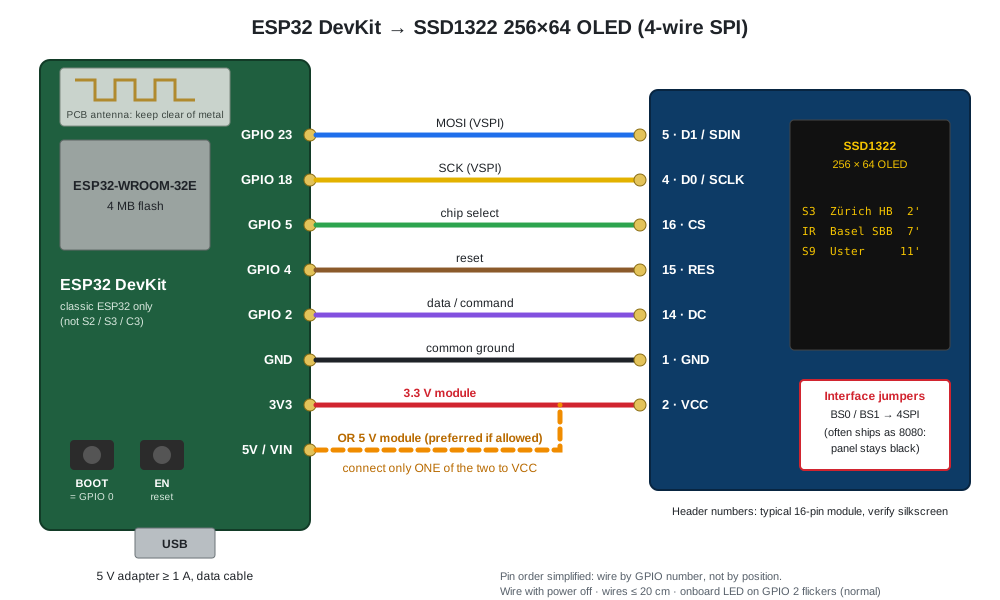
All you need is a classic ESP32 DevKit, a 3.12″ 256×64 SSD1322 OLED switched to 4-wire SPI mode, seven jumper wires, and about an hour.
Shopping list
ESP32 Board
ESP32 DevKit V1 / DevKitC (ESP32-WROOM-32E, 4 MB flash)
OLED Display
3.12" 256×64 SSD1322 OLED (4-wire SPI selectable)
Wiring
7× female-female jumper wires (≤ 20 cm)
Power & USB
5 V USB power supply (≥ 1 A) + USB data cable
Enclosure
3D-printed case (hardware/housing/shell.stl & cover.stl)
GPIO pin mapping (4-wire SPI)
D0 / SCLK
VSPI hardware clockD1 / SDIN
VSPI hardware MOSICS
VSPI chip selectDC
Data / command selectRES
Reset (pulsed at boot)VCC
Match your OLED module voltage ratingGND
Common groundWiring Diagram: ESP32 DevKit → SSD1322 256×64 OLED
From parts to live departures in 4 steps
1
Wire the SSD1322 to the ESP32
Verify the display jumpers (BS0/BS1) are set to 4-wire SPI, then connect the 7 pins between the ESP32 DevKit and the OLED with power unplugged.
2
Flash the ESP32 firmware
Clone the repository and run npm run firmware:upload with PlatformIO to flash the preconfigured esp32dev binary.
3
Connect to Wi-Fi via captive portal
Join the PTSpy-Setup-XXXX network from your phone, enter your 2.4 GHz Wi-Fi credentials, and point the backend URL to pts.rabus.me (or your own self-hosted API).
4
Pair on pts.rabus.me
Scan the QR code shown on the OLED or enter the 6-character code at pts.rabus.me/pair. Pick your Swiss station and watch live departures appear within seconds.
FAQ
Common questions about building, pairing, and running a board.
Can I use pts.rabus.me directly with my own ESP32 display?
Yes. Flash the open-source firmware onto your ESP32, point it to the live backend during Wi-Fi setup, create an account on pts.rabus.me, and pair your display using the 6-character code shown on the OLED.
Can I also self-host the entire stack?
Absolutely. The whole project is MIT-licensed. One docker compose up --build -d starts PostgreSQL 18, the NestJS 11 API, and the Next.js 16 dashboard on your own home server or VPS.
Why does the hardware guide emphasize switching BS0/BS1 to 4-wire SPI?
Most 3.12" SSD1322 OLED modules ship from the factory configured for 8080 parallel mode. Moving the BS0/BS1 jumper pads or 0 Ω resistors to 4SPI enables the 4-wire hardware SPI interface expected by the U8g2 driver.
Which public transport operators are supported?
All Swiss operators covered by transport.opendata.ch — including SBB CFF FFS trains, urban trams and buses (VBZ, BVB, Bernmobil, TPG, …), post buses (PostAuto), lake steamers, and mountain cable cars. Adding another region only requires implementing a transit provider in api/src/modules/transit/.
How do the API, web preview, and C++ firmware stay in sync?
A pinned contract fixture (screens.fixture.json) is tested in CI by Jest on the backend, node:test on the frontend canvas renderer, and PlatformIO native C++ tests (pio test -e native) on the firmware rendering logic.
Ready to pair a board or explore the code?
Use the hosted dashboard at pts.rabus.me to pair your ESP32 display and preview station layouts, or grab the firmware, STL files, and Docker stack on GitHub.